Redactor 3.4: many new features!
Today we're releasing Redactor 3.4, which is packed with new features and improvements.
Let's take a look!
Images & Media
We added a new Image Dimensions plugin to give you precise control over image sizes. When enabled and editing an image, you'll find a width and height input to tweak the sizing directly. This is automatically constrained to the aspect ratio of the image to prevent warping.
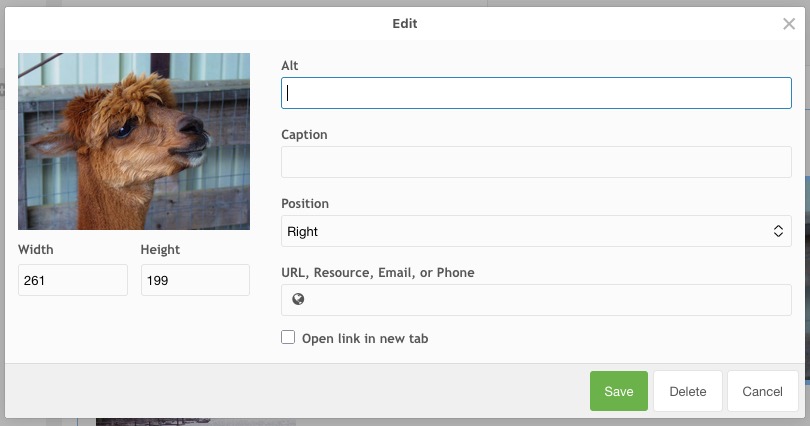
The Image Float Margin option will now also work as expected, applying the configured margin only to the sides that touches other content (so if you float an image right, it only adds a margin to the left).
Links
Links, both on images and regular links, now also support phone numbers. When the user enters a numeric format that looks like a phone number, it automatically adds the tel: prefix to the link, and shows it is recognised as a phone number.
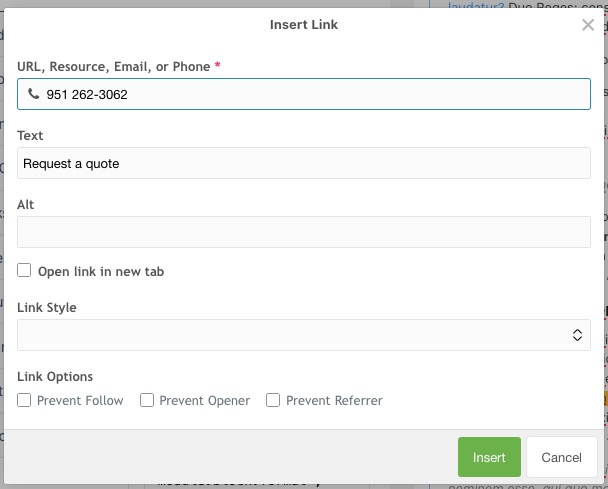
Parenthesis, spaces, and dashes are also supported.
As you can also see in the above image, there are now also new Link Options you can enable. These control the rel attribute and are useful for external links. And if you have a lot of external links, there is a new option available to check "Open link in new tab" by default.
Font size plugin
We've replaced the core fontsize plugin with a new one that allows you to specify the available font sizes. While most users will prefer using custom formatting, if you do want to give your users the ability to set specific font sizes that's now more convenient to do. It now also supports any format.
Processing tags
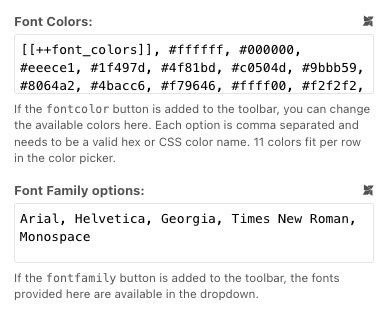
A select number of options, denoted by a little MODX icon in the configurator, now support MODX tags. This means that these options can be filled by using system settings, chunks, or snippets, enabling more complex configurations or shared configuration between sets.
We hope you enjoy these new features and improvements!
We've recently disabled comments as we don't care for Disqus's ads and don't use it enough to warrant a subscription. We may implement another commenting system soon. If you have any questions or comments, please feel free to send us an email! We're always excited to hear from you.